


104 | Email Template Tips
Read Time: 5 min 30 sec | 1,125 words


Quick Recap: What we’ve learned so far
101 | THE SET-UP | Create a Substack account.
102 | PUBLISH YOUR FIRST POST | Writing fiction vs nonfiction, navigating the user interface, and the settings worth remembering.

Moving right along, as you begin to “just write” on Substack you need to consider the extra bits that will appear in every single email you deliver. And Substack has simplified that to just be three areas:
Banner
Header
Footer
That’s all you get to work with but keep in mind these areas will be what your readers see first and should they read all the way to the bottom of your email, what they will see at the very end. Because these are things that, for the most part, should remain the same and you shouldn’t be changing too much unless it’s to tweak words, add something new of note, or update links, you need to be very intentional with what you put and why.
There are two ways you can get to this area of your email. The first is by going to your settings from your dashboard and scrolling a ways down till you get to the “Publication Details” section and click “edit” next to Email banner, header, and footer settings:

The other way you can get to this is when you click the “post” button when in your dashboard to start writing something new. At the top in a light grey color, you’ll see a button that reads “Update email template >”:
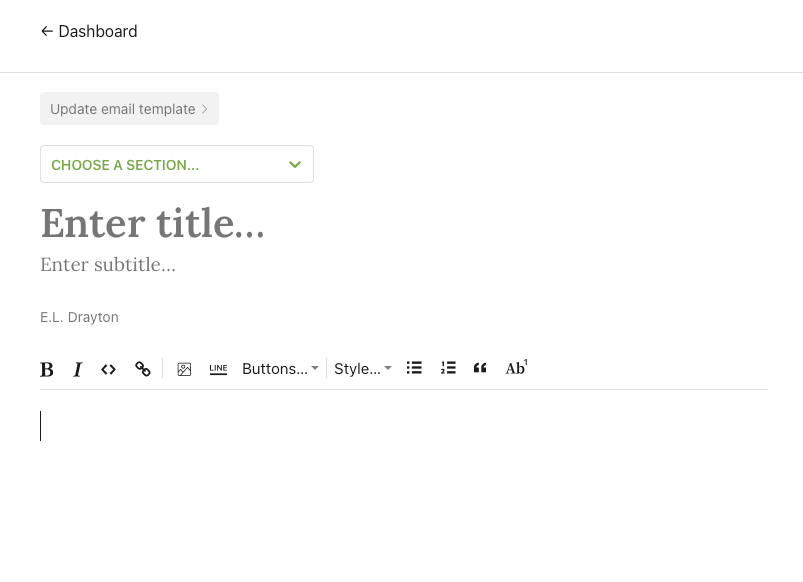
Here are some tips that I am currently using in my newsletter:
BANNER TIPS
Because the banner is the first thing your reader will see, it’s helpful to have an over-arching logo. Unfortunately, Substack doesn’t allow (to my knowledge) the ability to have a separate banner per section. So, to use me as an example, I currently have three active sections: The First Edition, The Creative View, and Friday Fiction 2.0. However, when I send an email under each of these sections they will all have the same banner that I upload here. And that should give you some pause to consider:
What is the “brand” you want to portray for yourself? If it’s your name and all of the sections associated with it, a simple banner with your name would suffice. If your brand is a company name instead, then go with that.
You don’t need a banner. Not all newsletters I receive have a banner. They are nice to have but not necessary. So, if the idea of creating one yourself or paying to have one done seems daunting, don’t sweat it. Start out without one. It won’t make or break your content.
Sometimes simple is better. Try not to make your banner too flashy with too much going on, especially if you have copy on the banner that might make it difficult to read.
HEADER TIPS
The header is a bit of text you’ll have at the beginning of your email. And this can literally be anything you want but here are some tips to get you thinking about what you should put there:
Keep it simple. Don’t be too wordy here. Remember your subscriber is going to see this every time they receive an email from you. If you have a block of text here before they get to your “new” content it can be off-putting and lead to unnecessary unsubs.
One to two short sentences max!
If you are going to include a link, make sure it’s a link to something of yours. Don’t link to someone else’s stuff. That doesn’t help you. This is your newsletter, not theirs. Include links to other people’s stuff within the body of your email, not in the header.
If you have a Facebook Group, Discord server, or anything that is community-oriented, this would be the best place to mention that. Your readers will see it and over time they just might join or they’ll just join right away, happy to know there is another level of connection they can build with you.
A friendly thank you message. Remind your reader how grateful you are that they’ve decided to subscribe. Seeing a brief thanks on every email also isn’t a bad thing.
If you have upcoming sales or deals on something you’re selling that you don’t want them to miss out on you can change this up for a limited time to include that offer. Maybe put a teaser and say the code for that discount is further down in the email. That way you can get them to read the whole thing.
FOOTER TIPS
The footer is everything that will come after you’ve completed your post and you’ve sent it to your email list. Be as wordy as you want. Just keep in mind that email readers rarely will read what you have to say down there so if you want it to be read, keep it snappy, keep it interesting, and throw in those links. Give’em something to click and a reason to do it!
Unlike the header, here you can include a bit more information if needed.
If you use affiliate links, putting a little note that there may be some contained in the clickable links is ideal. People don’t like it if they feel you are trying to pull a fast one on them so be transparent.
Any social media you want your subscribers to be aware that you also have like Instagram, Twitter, a YouTube Channel, Tik Tok, etc. Include those clickable links here.
If you have a sponsorship deal that will go on for several of our emails, you can include that copy here so you won’t forget to add it every time. But just make sure you’re keeping track of what you’ve got going. You don’t want to promote more than you promised.
WHAT NOT TO PUT IN THESE SECTIONS
Swaps of any kind with anyone. When you do a swap it’s usually a one-off. If you put them in your header or footer they will be included in every email. Unless that is what you want, you should be including swaps in the body of the specific email you are writing.
Images. I caution against putting images unless it’s a specific logo or something really darn important. It can make the email seem clunky if you have the same image in the header that is different from your banner (for instance). Unless that is the look you are going for.
Someone else’s links, unless it’s in the footer and intentional.
Lastly, whatever you put in the Header/Footer and whatever image used for the Banner, keep in mind the only ones who will see any of it are your email subscribers. So, if someone is newly arriving at your ‘stack via a link and they choose to “read more first” before they decide if they want to subscribe or not, they won’t see that. So make whatever you put there relevant to those who are already subscribed to you.
There’s no need to ask them to subscribe, however, you can include a button to share your ‘stack with others so they can subscribe.